Back to Welcome Page
Device Certificate Install Notice
These certificates allow your device to accept and trust web-traffic that has undergone inspection and monitoring from Whickham School’s web-proxy.
Without this installation your web traffic WILL still be monitored but may not display properly without error.Please note by installing the certificate files your again agree to all terms and conditions previously accepted and understand that Whickham School IT hold no responsibility for your device. The owner of the device is responsible for the installation and removal of these certificates
Whickham School IT Support
Apple Mac Installation Instructions
1. Please click this link to download the proxy certificate
Whickham School Certificate
2. The certificate will open in keychain and display all the details of the certificate. Please select “Always Trust” to continue.
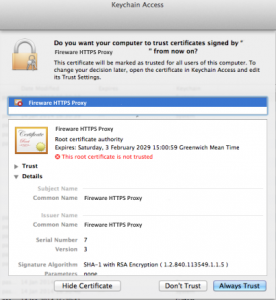
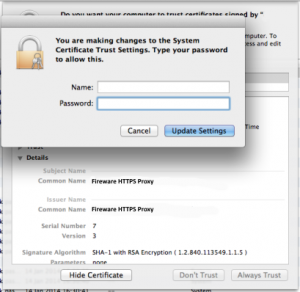
3. You may then be asked to enter your password or a username and password of someone with administrative access. Enter the username and password and then select “Update Settings”
4. You can now close Keychain Access to complete the process.